Friday, 14 October 2011

New Collection Of BSNL 3G Hack

By the introducing 3G services by various cellular companies in India, there has been a surge of information on the Internet regarding various hacking methods and tips and tricks for getting unlimited 3G service for free or accessing 3G services with 2G SIM. The top most targets of these hacking methods have been BSNL and MTNL as they were one of the first companies to introduce 3G in Indian market, some loopholes in their 3G operation structure and their nationwide network coverage. In fact in the initial days it was a common belief among 3G enthusiasts that BSNL was encouraging 3G hacking in order to promote this service among Indian consumers. In this article we will discuss some of the popular tips and tricks for hacking BSNL 3G. Please note that these methods have not been validated by the writer, and may or may not work depending upon the region, handset, and network coverage and time lapse from when the trick was discovered.

Trick to get unlimited BSNL 3G at the price of GPRS

1. The following is the latest trick that promises unlimited BSNL 3G but for some users the speed is dropping after couple of days:
  • You need a 3G enabled mobile and BSNL 3G SIM. You can convert your 2G SIM to #G by recahrging it with Rs1.
  • Recharge the 3G SIM with unlimited 2G plan RC274 for Rs 274. Then recharge with additional Rs10 to get 200MB of free usage.
Most users report getting 3G speed after first or second step. If you are not getting 3G speed then the trick is not working. So no need to follow step mentioned below:
  • If you are getting 3G speed, recharge your account with 2GB data plan RC98 for Rs98. With this plan you can enjoy unlimited 3G as your 2G data usage remains unchanged. You need to set the access point as BSNLGPRS or BSNLPREPAID.
2. The following hack claims to provide unlimited 3G speed for Rs249.
  • You need 3G enabled handset and BSNL 3G SIM.
  • Now make sure you have a balance greater than 250.
  • Send message GPRS249 to 53733 for unlimited GPRS.
  • From Handset menu go to Settings and select network operator as 3G or UMTS or WCDMA.
You can now enjoy unlimited 2G with speed of 3G.
3. This has been one of the most popular trick for getting unlimited BSNL 3G. For few subscribers it is not working anymore as BSNL has put a cap on the data speed. To perform this hack you need to do the following:
  • Have a 3G enabled handset and buy a 2G SIM from BSNL.
  • Make sure you have more than Rs50 balance. Send message GPRS PRE to 53733.
  • After GPRS is activated on your handset, buy an unlimited GPRS plan from BSNL.
  • From your handset menu go to Settings->Phone->Network->Network Mode and choose UMTS option.
  • Perform a manual search for BSNL 3G network. Once found it will be displayed on the handset as a small 3G logo and BSNL name.
If everything works correctly, you will see your signal to change from 2G to 3G.

Trick to get Unlimited 3G Access

Following is another very popular hacking method used by many users to get unlimited access to BSNL 3G network. Some users are reporting that it does not work anymore:
  • You need a 3G enabled phone and a BSNL 2G or 3G SIM.
  • Activate GSM on your os9.2 mobile from network settings.
  • Using web browser open any light website like Google.com and without closing the site change the network settings to UMTS. Now you will get free unlimited 3G.
  • For other phones where UMTS option is not available you need to use dual mode by changing network area. Open any site in 2G then roam to any area where 3G signal is available. You need to change APN to bsnlnet. You may need to restart your phone.
Now you are ready to enjoy unlimited 3G from your mobile. The same trick can be used on PC for accessing unlimited 3G.

Comments are needed For improvement of this article

Turn Your Mobile Into WiFi Hotspot

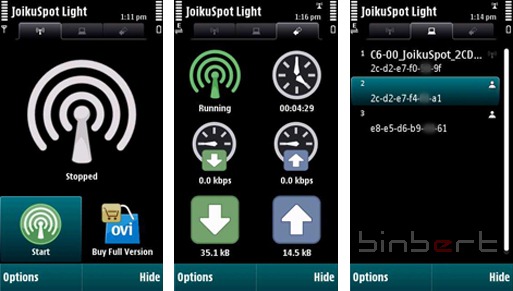
With the help of JOIKUSPOT application you can change your mobile in to a internet hotspot . If you have an internet connection via GPRS or 3G you can share the internet connection via wireless network (Wi-Fi). It is very easy to share your internet with multiple people. It will work like a normal HotSpot you can access this from any Wi-Fi enabled devices like Laptop, iPhone, other mobile phones. Using this application you can avoid the complicated setup of PC suite and manual dial up via USB cable or a Bluetooth. This is also a nice idea for 3G Wi-Fi hotspot.
joikuspot nokia c6
Here I tested with a free version of JOIKUSPOT (Joikuspot light) , Full version support Data encryption, Access point name change, VPN access, Other internet protocols like POP SMTP. Full version can download from the developers website or OVI store
Download JOIKUSPOT Light from OVI store, and open like all other mobile apps. There are no complicated settings. Once you open the application you can see a Start button, the access point will ready when you start it. Application will show the users connected to the hotspot, the data usage, total data usage etc.
Download from OVI : JOIKUSPOT

Hawking HWREN1 Hi-Gain Wireless-300N Range Extender1000mW 1W 802.11g/n High Gain USB Wireless G / N Long-Rang WiFi Network Adapter - Dongle With Original Alfa 5dBi and 9dBi Rubber Antenna *Strongest on the Market*Hawking HSB2 HiGain Signal BoosterAlfa AWUS036H 1000mW 1W 802.11b/g USB Wireless WiFi network Adapter with 5dBi Antenna and Suction cup Window Mount dock - for Wardriving & Range Extension

Download UpDates 2011-05 For Your iphone


DOWNLOAD iPhone Update 2011-05
Here is another fresh update for all you to enjoy.

10.Pin.Shuffle.Bowling-v1.52.ipa
123.Color-v2.0.12.ipa
24-7.Fitness.Plus-v2.1.ipa
4DCalendar-v1.1.ipa
Across.Age-v1.4.7.ipa
Aeon.Racer-v1.1.0.ipa
Air.Supply.1bit.Run-v1.1.ipa


Alcohol.Test!-v1.0.1.ipa
Alert.Meteor.2-v1.3.ipa
All-in-1.Logic.GameBox-v1.8.ipa
Angry.Birds.Seasons.Walkthrough-v1.21.ipa
Angry.Birds.Seasons-v1.3.0-DaDude1973.ipa
Angry.Birds-v1.5.3-DaDude1973.ipa
Angry.Egg-v1.1.ipa
Angry.Family.HD-v1.0.2.ipa
Annexation-v1.9.ipa
aNote-v5.0.ipa
Apexis.IP.Control-v1.02.ipa
Apple.Shoot-v2.1.ipa
Aralon.Sword.and.Shadow.HD-v3.01.ipa
Ascendancy-v2.17.2.ipa
Asphalt.Audi.RS.3-v1.0.0.ipa
Audubon.Giudes.Butterflies-v1.1.ipa
Backbreaker.Football-v1.9.1.ipa
Barcode.Scanner.Shopping-v1.0.ipa
BassLine-v3.2.ipa
Battery.Boost.Magic-v6.1.ipa
Beachbum.Berry's.Tiki.Plus-v2.0.ipa
Beat.Bots-v2.3.ipa
Beltegoed.Kiwi.KPN-v1.14.ipa
Billabong.Surf.Trip-v1.3.2.ipa
BirthdaysPro-v1.6.ipa
Black.Ops.Ultimate.Utility-v2.1.ipa

Bloomberg.Sports’.Front.Office.2011.Baseball.Draft.Kit-v1.1.0.ipa
Boardz-v1.6.0.ipa
Book.Crawler-v3.0.ipa
BoxyTunes-v1.3.ipa
BrainsPool-v1.0.ipa
BreakOut.Mania.PRO-v1.0.ipa
Camera.Flash-v4.7.8.ipa
CameraSync-v1.1.1.ipa
Circuloid-v1.0.1.ipa
Cloud.Browse-v2.3.1.ipa
Collision.Effect-v1.1.1.ipa
Cool.Bean-v1.0.ipa
Countdown-v4.2.6.ipa
Cows.vs.Aliens-v1.1.ipa
Crazy.John-v1.3.ipa
Creatures.and.Castles-v1.62.ipa
Cribbage.HD-v1.5.3.ipa
Crystal.Synth.XT-v1.2.ipa
Cupcakes!-v1.9.ipa
Dino.Rush.SE-v1.3.ipa
djay-v1.0.ipa
DreamApp-v1.50.ipa
dreaMote.Pro-v1.0.1.ipa
DSLR.Bot-v2.0.ipa
Dungeons.and.Such-v2.0.5.ipa
DVD.Player.for.iPad-v2.43.ipa
Echofon.Pro.for.Twitter-v4.0.3.ipa
Elektor.Electronic.Toolbox-v3.05.08.ipa
ESPN.Radio-v3.2.106.ipa
Evil.Bricks-v1.01.ipa
Excavator-v1.7.ipa
Extreme.Formula-v1.3.ipa
Facebook.Album.Downloader-v1.0.6.ipa
Fairlight-v1.0.ipa
Falling.Fred-v1.0.2.ipa
Fat.Kiosk.HD-v8.3.ipa
Filer-v2.1.2.ipa
Files.Pro-v1.8.1.ipa
Flick.Kick.Football-v1.6.ipa
FlickStackr-v1.7.2.ipa
FlightRadar24.Pro-v2.3.ipa
FunkBox.Drum.Machine-v2.0.ipa
Game.Factory-v3.33.ipa
GameBox.1.Elite-v1.2.1.ipa
GameBox.1-v4.0.2.ipa
GoblinGun-v1.0.2.ipa
Golfplan-v1.4.ipa
Google.Search-v0.8.0.6023.ipa
GoReader-v1.6.1.ipa
Gravity.Gambit.HD-v1.1.ipa
HD.Ringtone.Creator-v2.1.0.ipa
Hired.Gun-v1.6.ipa
Hottest.New.RNB.and.HipHop-v2.2.ipa
Hysteria.Project.2-v1.2.ipa
iBomber.Defense-v1.2.ipa
iCamera.HDR.AIO-v1.6.ipa
iCollect.Books-v3.9.3.ipa
iCollect.Movies.Pro-v4.1.1.ipa
iDownload-v2.2.ipa
iFood.Pro-v1.2.ipa
iHotFuzz-v1.0.ipa
iKungFu.Master-v1.5.ipa
INSPIRO-v1.2.2.ipa
Instapaper-v3.0.1.ipa
Iron.Wars-v1.3.ipa
iSilo-v5.26.ipa
iSMEStorage-v2.09.ipa
iSniper-v0.3.7.ipa
iSutras-v3.0.3.ipa
iTranslate.Plus-v5.0.ipa
Jane's.Zoo-v1.0.ipa
Jay.and.Silent.Bob-v1.3.0.ipa
Jelly.SMS-v3.1.7.ipa
Jumping.Dog-v1.2.ipa
Kinetic.GPS-v1.09.ipa
Knight's.Dash-v1.0.ipa
Lingo.SD-v2.1.1.ipa
List.txt
Location.Tracking.GPS.Pro.for.iOS4-v2.2.ipa
Lost.in.the.Amazon-v1.1.ipa
MadCap-v1.1.1.ipa
Magical.Wars-v1.2.ipa
Mahjong.Artifacts.2-v1.7.ipa
Mahjong.Artifacts-v1.4.ipa
Manga.DL-v1.9.1.ipa
Map.Generator.Portable-v1.2.ipa
mapPoints-v2.0.4.ipa
Matching.Game.Baby.Animal.Pairs.for.Kids-v4.0.ipa
McFind-v2.0.ipa
Mechanic.Panic-v1.1.ipa
miCal-v2.7.1.ipa
Minion.Wars-v1.6.ipa
MotoGP.2011.Official.Live.Timing.Premium.Pass-v2.2.ipa
Multiplayer.Texas.Hold'Em-v1.0.1.ipa
MultiTrack.DAW-v3.0.2.ipa
My.Photo.Albums-v1.6.1.ipa
MyLyricsPlus-v1.4.ipa
National.Geographic.World.Atlas-v2.0.ipa
Navionics.Marine.Mediterranean-v5.0.1.ipa
Neander.Block-v1.8.ipa
NeoDefender.2-v1.3.ipa
Neuroshima.Hex.Puzzle-v1.0.ipa
Ninja.Ropes.Xtreme.2-v1.1.0.ipa
noteplex-v1.16.ipa
Notesy.for.Dropbox-v1.6.ipa
Oxford.Deluxe-v3.5.ipa
Pandora.Radio-v3.1.8.ipa
PC.Monitor-v1.3.4.ipa
Photoshop.PSD.Viewer-v1.0.3.ipa
Pics-v2.5.ipa
Pimp.Your.Screen-v1.0.ipa
Pin!-v1.4.1.ipa
Pirbot-v2.0.ipa
Plane.Finder-v2.30.ipa
Pop.the.Pigeon-v1.2.1.ipa
PorscheMania-v1.40.ipa
Princess.Pony.Matching.Memory.Cards.Game-v2.0.ipa
Puzzle.Pond-v2.0.0.ipa
QuakeWatch-v2.4.1.ipa
QuickShot.with.Dropbox-v1.5.ipa
Real.Chess.Professional-v1.0.ipa
Real.Soccer.2010-v1.4.7.ipa
Remoter.VNC-v2.00.ipa
Remote-v2.1.1.ipa
ReRave-v1.0.ipa
ReWord-v1.1.ipa
Robin.Hood.Sherwood.Legend-v1.95.ipa
Romance.Of.Rome-v1.2.ipa
Russian.Painting-v1.1.ipa
Shift.Worker-v1.4.1.ipa
Ship.Finder-v2.30.ipa
Sky.Mushroom-v1.0.2.ipa
Solitaire-v3.0.ipa
Space.Freight-v1.20.ipa
Spectre.3D-v1.2.0.ipa
Speed.Tracker-v2.2.ipa
Speedball.2.Evolution-v1.2.ipa
Spore.Creatures-v1.0.1.ipa
StarMap.3D-v2.45.ipa
StarPagga-v1.98.ipa
Stupid.Zombies-v1.3.ipa
Surviving.High.School-v1.2.4.ipa
technoBox2-v2.0.0.ipa
The.Last.Stand.Zombie.Apocalypse-v1.1.0.ipa
TiSageTV-v1.10.ipa
Tom.Clancy's.Rainbow.Six.Shadow.Vanguard-v1.0.0.ipa
Top.Dance.Music-v1.6.1.ipa
Torrent downloaded from Demonoid.com.txt
Train.Conductor.2.USA-v2.5.ipa
Trillian-v1.5.4.1.ipa
TtV.Camera-v2.0.ipa
Turbo.Grannies-v1.0.ipa
Type.Type.Train-v1.0.ipa
UFC.Undisputed.2010-v1.143.2.ipa
UFO.Skeet.Shoot-v1.1.ipa
Ultrablast-v1.4.1.ipa
Uncross.It-v1.1.4.ipa
Vernier.Video.Physics-v1.1.2.ipa
Video.Stream-v1.1.1.ipa
Virtual.Villagers.3.The.Secret.City-v1.1.0.ipa
VLC.Streamer-v1.50.ipa
Volcano.Escape-v1.1.ipa
Warring.States.XD-v1.01.ipa
Weerbericht-v2.56.ipa
WhatsApp.Messenger-v2.6.2-DaDude1973.ipa
Wheeler's.Treasure-v1.3.1.ipa
WiFi.MediaBox-v1.0.ipa
Wyse.PocketCloud.Pro-v2.1.217.ipa
X3000-v1.4.ipa
X360.Magazine-v2.0.9.ipa
X-Plane.Airshow-v9.650.ipa
Yslandia.MMORPG-v1.6.245.ipa
Zombies.Tactics-v1.1.ipa
01.WhatsApp.Messenger-v2.6.2.ipa
02.Tiny.Wings-v1.0.ipa
03.Angry.Birds-v1.5.3.ipa
04.STREET.FIGHTER.IV-v1.00.06.ipa
05.Angry.Birds.Seasons-v1.3.0.ipa
06.Pimp.Your.Screen-v1.0.ipa
07.Plants.vs.Zombies-v1.5.ipa
08.Doodle.Jump-v1.29.ipa
09.Weerbericht-v2.56.ipa
10.Pin!-v1.4.1.ipa
11.Week.Calendar-v2.2.2.ipa
12.Fruit.Ninja-v1.6.ipa
13.Cut.the.Rope-v1.2.1.ipa
14.iStunt.2-v1.0.ipa
15.FatBooth-v1.1.3.ipa
16.Camera+-v2.1.1.ipa
17.Sleep.Cycle.Alarm.Clock-v3.0.ipa
18.Amazing.Sound.Effects.AIO-v1.3.ipa
19.Bejeweled.2+Blitz-v1.4.ipa
20.TETRIS-v1.2.62.ipa
21.TuneIn.Radio-v1.7.1.ipa
22.Voetbal.nl-v1.2.ipa
23.Hipstamatic-v201.0.ipa
24.Sonic.The.Hedgehog.4.Episode.I-v1.2.ipa
25.Star.Walk-v5.1.2.ipa
 
 
Download links
                                                filesoni part01
                                                            filesonic part02
                                                            filesonic part03
                                                            filesonicpart04
                                                            filesonic part05 
                                                           filesonic part06
                                                           filesonic part07
                                                           Filesonic part08  
                                                          filesonic part09 
                                                           filesonic part10  
                                                          filesonic part11   
                                                         Filesonic part12
                                                          filesonic part13
                                                        Filesonic part14
                                                       filesonic part15
                                                       filesonic part16


Mobile TV With BSNL 3G And FAQ


BSNL has launched live Tv on mobile with Apalya Technologies   to BSNL’s 3G  EDGE/GPRS customers.  To avail this service, the customers having 3G, EDGE/GPRS need to send an SMS  “MYTV”to 55447 and download mimobi.tv application. You can also download the application from  http://59.162.166.210:8080/OTA/DownloadMimobiTV/
Apalya Technologies has tied up with leading media companies like NDTV, AAJTAK, CARTOON NETWORK, TIMES NOW, ZOOM, BINDASS, ETV, TV9, India Vision, MAATV, INDIA TV, CNN-Mobile to deliver wide varieties of contents for the end to end mobile TV & video solution to BSNL’s EDGE/GPRS Customers. The subscribers will be able to watch both Live TV and On Demand Video.

How to Subscribe BSNL 3G Mobile TV:

  • SMS to 55447 ,a reply message with a link will be received.
  • Click on the link to download application
  • Application gets installed and can be seen in menu
  • when clicked on mobile tv icon,list of Tv channels gets displayed
  • click on the channels and subscriptions plans are offered
  • select the plan and then enjoy watching tv on mobile

MIMOBI.TV is offered in three different packages-

Pay Per Day Package: Rs. 10 per day, access to a group of channels like TIMES NOW, ZOOM or AAJTAK, HEADLINE NEWS or only MAA TV or only TV9 etc. Pay Per Day package provides you the facility to watch any one favorite channel group for full 24 hours. You will not be able to choose more than one group in Pay Per Day subscription as it provides facility to access only one channel group per day. You can unsubscribe and add other Per Day Package. If you are subscribed for Pay Per Day package then next 24 hrs from the time you registered you can access to another channel group.
Monthly Package: Rs 150. Access to all available channels under basic package for one month. With Monthly subscription package, Customers  are free to view all channel groups you wish to see that MIMOBI.TV provides for a whole month.
Per Channel Package: Rs 50 per month, access to only specific channels. This subscription provides to view any one channel for a month.
To register for MIMOBI.TV, download MIMOBI.TV software. Then MIMOBI.TV icon will be available in your phone and click it to go through the registration process. Go to options button and select the Registration Plan. Select your subscription type either Monthly Plan or Pay-Per-View plan.
You can activate MIMOBI.TV if you have a prepaid connection also,provided you have enough balance to get registered with it. MIMOBI.TV accessing is not dependent on access point. You just need to have model that MIMOBI.TV supports. To install and run the MIMOBI.TV you must have minimum of 2mb free memory.

Supported Devices for BSNL 3G Mobile TV

Series 60 devices: FP2: Nokia 3230, 6260, 6600, 6620, 6630, 6670, 6680, 6681, 6682, 7610, N70, N72
FP3: Nokia N90, S60 ThirdEdition, 3250, 5500(sport), 5700(Express), 6110(Navigator), 6120(Classic), 6121(Classic), 6290, E50, E60, E61, E61i, E62, E65, Nokia E70, Nokia E90, Nokia N71, Nokia N73, Nokia N75, Nokia N76, Nokia N77, Nokia N80, Nokia N91, Nokia N92, Nokia N93, Nokia N93i, Nokia N95
J2ME Devices: SonyEricsson K550, K610, K790, K800, K810, W580, w610, W660, W710, W830, W850, w880, Z310, Z610, Z710, K310, K320, K510, W200, W300, W550, W600, W810, W900, Z530, Z550, Z558, K600, K750, V600, W700, W800, Z520, Z525

BSNL 3G Mobile TV Frequently Asked Questions (FAQ)

Q) I have already registered using my SIM Card on my mobile handset. Now I am using a different handset, why does MIMOBI.TV show me registration screen again?
A) When you install MIMOBI.TV application on your mobile then the application will automatically start from the beginning for the first time. As you are already registered tried to register again with the same Plan you opted at the time of registration without any subscription charges. If you try to register with some other plan the charges would be taken into consideration. And you will be subscribed with the new plan only.
Q) Can I preview other channels, which are not a part of my Per-Day package or my monthly package before subscribing to them?
A) Yes, you are free to watch channels before subscribing any service. You will not be able to preview once you are registered with any of these packages.
Q) How long is the preview available for?
A) Preview is available for only 1 day from the day you have opted it.
Q) I would like to add more groups to my Per Day Package, what should I do?
A) No, Pay Per Day does not provide you the facility to view more channel groups. To watch more than one channel group get accessed with Monthly Plan subscription.
Q) How many channels do I get when I subscribe for a monthly package?
A) You will get all the BASIC channels MIMOBI.TV provides for Monthly subscribers.
Q) Why am I not able to see all the channels?
A) If you are Pay Per Day subscriber, then there is no facility to watch all channels. If you are a Monthly Subscriber, Check your Personalization option whether you have Unmarked channels. Check Personalize option in your Channels screen and Programs screen whether you have unmarked any channels.
Q) I am a prepaid subscriber, I am trying to register using the monthly//per channel package, how long will it take to register me?
A) For a Pre-paid customer to get registered for a monthly or Per Channel Package with MIMOBI.TV it may take 24 to 48 hours.
Q) I am a postpaid subscriber, I am trying to register using the daily package, how long will it take to register me?
A) For a post-paid customer to get registered for a monthly or Per Channel Package with MIMOBI.TV it may take 24 to 48 hours.
Q) I have registered for a Monthly/ /Per Channel, but I keep getting the Alert saying “Check Registration Status”, Why is that, and what should I do?
A) Your registration should be activated once you have received an SMS confirming your Registration. It would take 24 to 48 hours to get registered for Monthly or a Per Channel Package, if it has been more than 24 to 48 hours please escalate the case.
Q) I have registered for a Monthly/Pay Per Day/Per Channel and I got SMS message saying “Your MIMOBI.TV has been activated”. After that I invoke MIMOBI.TV and it still says “Check Status” and when I try to check the status the GPRS symbol keeps blinking and nothing happens.
A) The network seems to be weak, please try accessing from a different location or at a different time.
Q) I have installed CELLONE MIMOBI.TV; please register me for monthly plan.
A) In the Registration Screen, Go to Options menu. Go to Change Registration Plan.
Q) When I click on “Check Status” It says, “In Progress” what does it mean?
A) The registration you had requested is received but yet still has not been activated. Please check back within 24 to 48 hours.
Q) How long it would take for the Registration to be activated?
A) It may take about 24 to 48 hours to get your registration activated.
Q) When I click the “Check Your Status” I get an error saying “Pre-Paid Balance Low”
A) To activate any plan you must have enough balance to get subscribed. So, check your balance and proceed further.
Q) When I click the “Check Your Status” I get an error saying “XXXXXXXXXXXX” ?
A) Due to the heavy traffic in your network, sometimes you can’t be able to access the application. Try it later.
Q) When I am trying to register I get an error message saying “Phone Model Not Supported “?
A) MIMOBI.TV application works only on few device models. So, check out your model support with MIMOBI.TV on website.
Q) I get an error message saying “Re Register to view MIMOBI.TV”?
A) When your Preview option has been expired and yet you are not subscribed to either of the subscription packages then the re-register message would pop up.
Q) I am registered for Monthly Package, how can I change to Per Day Package? If so, how?
A) To switch your plan from Monthly plan to Pay Per Day package try to unsubscribe and then reregister with Pay Per Day package from the registration screen.
Q) I am registered for Daily Package; can I change to Monthly Package? If so how?
A) Yes, you can change Monthly plan from Pay Per Day package. After 24 hours from the time you registered as Pay Per Day you are free to switch to any other plan.
Q) It has been more than a day since I have registered for MIMOBI.TV; It still shows “Check Registration Status”?
A) Your request is still in Process. As soon as your request is activated you would receive an SMS, please try accessing after you have received the SMS.
Q) I got an SMS saying my MIMOBI.TV Service is activated, but when I go to access MIMOBI.TV, It still shows the Status as “IN PROGRESS”?`
A) Your request is received to our service but still has not been activated. Please check back in a hour.
Q) I installed MIMOBI.TV app, registered for monthly plan and was using it. Somehow I reinstalled MIMOBI.TV app and it shows me registration screen again. What happened to my previous registration plan?
A) When you re-install MIMOBI.TV application on your mobile then the application will automatically start from the beginning for the first time. As you are already registered tried to register again with the same Plan you opted at the time of registration without any subscription charges.
Un-subscription
Q) I am a Pay Per Day subscriber. How to unsubscribe from Monthly plan?
A) To subscribe from Monthly Plan click Check Registration Plan
Select Unsubscribe
Q) I have subscribed for Pay Per Day package. Why do not I get unsubscribe option for the same.
A) Automatically you will get un-subscribed from the plan after 24 hrs of registration. To subscribe again you need to get re-registered.
Q) What purpose is the Un subscription option used?
A) This provides you the facility to switch from one plan to any other plan and also to unsubscribe to this service at any point of time.
Q) How long does it usually take for the Un-subscription to happen?
A) The Un-subscription would usually take anywhere from 24 to 48 hours.
General
Q) How to check whether the program is updated or not?
A) Whenever a program is selected to watch, Time and Date of the updated program will be shown on the screen.
Q) How to increase or decrease the volume while watching a program?
A) Press left navigation key to decrease the volume. Press right navigation key to increase the volume up to the extent needed.
Q) How to handle a telephone call while watching video?
A) Downloading completes MIMOBI.TV handles it and you can attend or discard the call.
Q) If a SMS/mms is received in the middle of a program then how to handle it?
A) A message icon is displayed on the top right corner of the screen when you are watching the program if SMS received.
Q) Will I be able to hear alarm while watching the clip?
A) Yes, clip will be automatically paused when alarm occurs and then after snoozing it you will be able to watch the program from the paused state.
Q) What models can be used to access MIMOBI.TV?
NOKIA 6600, NOKIA 6630, NOKIA P930, NOKIA 6680, NOKIA 6681,
NOKIA 6682, NOKIA 3230, NOKIA 6670, NOKIA 7610, NOKIA 6620,
NOKIA 6260, NOKIA 7650, NOKIA 3650, NOKIA 3620
Q) Can I send MIMOBI.TV to my friend?
A) NO, Currently CELLONE MIMOBI.TV does not support Blue Tooth download.
Q) The clip was playing smoothly but suddenly MIMOBI.TV had logged off.
A) Signal is weak.
B) Battery failed
Q) How often are the programs updated?
A) Programs are updated frequently, Check the time displayed when the clip starts playing.
Q) How do turn off playing the trailers?
A) Press the PAUSE key and the content would automatically start playing once the clip has buffered.
Q) I get a message saying, “Channels/Programs updated “what does it mean?
A) This means that either new channels/programs have been updated or deleted.
Q) I click on a program it comes back and says “Program not available” and “Channels/Programs updated “?
A) The program you have requested is no longer available.
Personalization
Q) How do I personalize my MIMOBI.TV?
A) You can manage your preferences by selecting options (left soft key) and marking/unmarking the item you want to set and can get quickly accessed.
Q) How to add channels and programs in personalization from player screen?
A) Click Option and select Personalize.
B) Mark/ Unmark channels list if you are in the Channels screen
C) Mark/ Unmark the programs list if you are in the Programs screen.
D) Press Ok.
APN setting for mimobi.tv by BSNL
Note:
1) If the APN setting already exists on your Handset, no need to create them once again.
2) For Nokia Handset, make sure that while downloading, the APN, are set for your phone browser. Following are the details to set your browser with the APN.
Open your default browser (Web/Services – icon names may change with a phone).ü
Click Optionsü > Scroll Down > open Settings > choose your default APN.
3) For Sony Ericsson Handset, make sure that your default APN is selected while downloading the application, in your internet setting.
SOUTH ZONEØ
NOKIA HANDSETS to download mimobi.tv
From the main Menu, go to Tools folder and select Settings > Connection > Access points
From Access Points menu, select Options > New Access point > Use default settings.
Next, for each of the fields enter accordingly
Connection name – BSNL-WAP§
Data bearer – GPRS§
Access point name – wapsouth.cellone.in§
User name – ppp§
Password – ppp123§
Prompt Password – No§
Authentication – Normal§
click on Options > Advanced Settings
Proxy server address – 10.31.54.2§
Port number – 9401§
SONY ERICSSON HANDSETS to download mimobi.tv
From the main Menu, go to Connectivity > Date Comm. > Data Account > New Account > GPRS data > add
  • § Name – BSNL-WAP
    click on CONTINUE
  • § APN – wapsouth.cellone.in
    § Username – ppp
    § Password – ppp123
    click on SAVE
Again select BSNL-WAP, click on Edit
§ Authentication – PAP
From the main Menu, go to Connectivity > Internet Settings > internet profiles > New profile > add.
  • § Name – BSNL-WAP
    § Connect Using – BSNL-WAP
    click on SAVE
Select the BSNL-WAP in the list, click on More > Setting >
§ Connect using – BSNL-WAP
§ Internet mode – HTTP
§ Use Proxy – Yes
§ Proxy Address – 10.31.54.2
§ Port number – 9401
click on SAVE
SONY ERICSSON HANDSET to watch mimobi.tv
From the main menu, go to Connectivity > Date Comm. > Data Account > New Account > GPRS data > add
• Name: TVSOUTH
click on CONTINUE
• APN – tvsouth.cellone.in
From the main menu, go to Connectivity > Settings for Java > New profile > add.
• Name – TVSOUTH
• Connect Using – TVSOUTH
click on SAVE
while watching a program use, select TVSOUTH in Settings for Java

Hack Your Android Phone

You want to take control of your Android phone? By "rooting" your device, a process similar to jailbreaking an iPhone, you can install custom ROMs (images), which add stability and speed improvements to Google's mobile operating system.....


Why Hack Android?

So why would you want to hack your Android phone? For those with older handsets, rooting the device lets you install customized ROMs which can deliver major speed improvements and performance increases. For example, the popular CyanogenMod, created by one of Android's most notable hackers, optimizes performance for both the G1 and MyTouch 3G handsets.

Another good reason to root your phone? Multi-touch. One of the surprising omissions from Google's own Nexus One handset, for example, is the ability to use more than one finger at a time to operate the device. Although available on iPhone from the start, the Nexus One excludes this valuable feature from its mobile operating system. Why? No one knows for sure, but it might have something to do with some patents Apple owns. But that's no matter to the hacker community. Thanks again to cyanogen, Nexus One owners can enable the feature by copying some files over to their device. Other Android owners can perform similar procedures to enable multi-touch Web browsing. But before you can get started with any of these hacks, you first have to root the phone.

How to Root Your Android Phone

However, for novice hackers, "rooting" the phone sounds like it may be easier said than done. Although seemingly intimidating, by following a few simple steps anyone can do this with ease.
Before getting started, remember to back up your phone, including your contacts, SMS messages, files and photos.
  1. The first step is to download and install Superboot, a boot image that, when flashed, will root the device the first time you boot up. You can grab a copy of the Superboot zip file from the Modaco forums here.
  2. Once downloaded, extract the files it contains to a directory on your computer, just like any other zip file.
  3. Now put your Android phone in bootloader mode. (Note, owners of a retail N1 should see instructions here).

    • To do so, turn off the phone, remove the battery, and plug in the USB cable. When the battery icon appears onscreen, pop the battery back in. Now tap the Power button while holding down the Camera key.
    • For those whose Android phones have a trackball, you have an even easier method of doing this: Turn off the phone, press and hold the trackball, then turn the phone back on.
  4. Depending on your computer's OS, do one of the following
    1. Windows: Double click "install-superboot-windows.bat"
    2. Mac: Open a terminal window to the directory containing the files, and type "chmod +x install-superboot-mac.sh" followed by "./install-superboot-mac.sh"
    3. Linux: Open a terminal window to the directory containing the files, and type "chmod +x install-superboot-linux.sh" followed by "./install-superboot-linux.sh"
That's it, your device has been rooted!


If those instructions confused you, check out YouTube for instructional videos instead. Here's one for rooting the  myTouch 3G or G1, and here's one for the  Motorola Droid. Here's  another. There's also an alternative rooting method involving 1 click demoed  here. You get the idea.

Now What?

Now that you've rooted your Android phone, you can get busy adding features, functionality and other hacks. This is the fun part! LifeHacker offers five great reasons to root your phone, for those wondering why you would bother to do this.
Our favorite reasons?

1. Multi-Touch

First of all, Nexus One users can enable multi-touch on their devices. RedmondPie has a good how-to on this:
 
 
 Meanwhile, Droid owners can hack their phones for multi-touch Web browsing


 T-Mobile G1 owners can do this too following the instructions here


2. Mods for Performance Improvements (and More)

G1 and myTouch 3G owners can follow this tutorial to install the popular CyanogenMod on their devices, which boosts performance and speed, among other things. Here's a video tutorial on this via AndroidandMe.com
If you need more information, visit the cyanogenmod Wiki  for all the details on this custom ROM. And stay tuned to the latest Cyanogen news via this website 

3. Extra Apps and Features

For more fun hacks, try these:
Anyone with a rooted handset can set up Wi-Fi and Bluetooth tethering using this app .The ever-popularApps2SD software lets you migrate your Android apps over to your SD card, freeing up room on your phone. You can also install custom themes, ringtones and alerts.


More?

If you've hacked your Android phone, share your tips and tricks in the comments. Or if you have links to other good hacks, let us know.


Twitter users hit by viral hack attack

Twitter users were victims of a cross-site scripting (XSS) vulnerability today as users reported message pop-ups and third-party websites being accessed without consent.

In a statement, Twitter said the exploit is now fully patched. "We have identified and are patching an XSS attack; as always, please message @safety if you have info regarding such an exploit," said Twitter.

Flash Hacking

Ever wanted to score higher in Kitten Cannon? How about owning at Defend the Castle from the very first level? Some jumps in N-Game too hard for you? Maybe you're ticked off by that guy who got several billion in Push the Button. Whatever the motive, you're here for one reason, you want to hack flash games.
All flash games are written in a code called Actionscript. It'll help you if you know it, but the code is straightforward enough to where even a n00b could do this with almost any game they wanted.
http://zenwarfare.com/flash_hack.php